Labels

Showing posts with label Keyboard. Show all posts

Wednesday, August 10, 2011

Targus Versavu Keyboard and Case for iPad 2


The first case we ever saw for Apple's iPad 2 was the Targus Versavu. A thick, leather case with a unique center pivot, the Versavu is a stand-type case folio that can fold back to display the iPad 2 in portrait or landscape mode. With the plethora of keyboard cases that have suddenly arrived onto the flooded iPad accessory scene, it's not much of a surprise that Targus has repurposed the Versavu case with its own embedded keyboard. The $99 Versavu Keyboard and Case for iPad retains the Versavu's sturdy feel and rugged build, and might have been a candidate as one of the best keyboard cases we've ever used--if it weren't for its keyboard.


The keyboard's problem isn't build quality--in fact, far from it. Solidly lodged into the plush suedelike microfiber inner lid, the black plastic keyboard has raised island-style keys with excellent key travel. No, the problem is with the keyboard layout, and its unfortunate compression on the edges. A casual eye might think the Versavu's keyboard is identical to a Netbook's, but it isn't: several keys normally dedicated to the colon, semicolon, and question mark have been removed, and their functions remapped onto other QWERTY keys instead (the question mark key is now awkwardly set on the N key, for instance). It's a slight knock, but a serious one if you're a time-pressed writer who's looking for a physical keyboard to resolve the awkward transpositions that already beset Apple's virtual onscreen keyboard. Sadly, it turns what should be rapid-fire typing into occasional missed keys and finger-fumbling. Otherwise, it's an extremely good keyboard. iPad-specific buttons are laid out on a dedicated row above the numbers. Pause/track skipping, volume control, cut/paste, and shortcuts for Spotlight, picture gallery and the home buttons can come in handy (music controls more than the others).

One of the unique qualities about Targus' case is its fully rotational iPad mount. The black leather case has a plastic shell between its foliolike front and back cover that the iPad 2 snaps into; this back cover is attached to the leather via a circle-shaped rotating pivot with a large hole in the middle that exposes the Apple logo. The iPad 2 can swivel 360 degrees into either landscape or portrait orientation--the bottom-most edge of the case slots into a groove on the rear of the keyboard. In landscape mode the angle is too upright and feels oddly balanced when typing, but it's perfect in portrait mode. When closed for travel, raised suede side bumpers on the keyboard protect against contact with the iPad's screen, and an elastic band stretches across the back to seal it shut.


The Targus keyboard charges via a Mini-USB port (cable included), and can plug into a laptop or any standard USB port-studded charger. An on/off switch and a Bluetooth syncing button activate pairing with the iPad 2. Once Bluetooth is searching, the iPad 2 asks for several digits to be typed before activating the pairing. Response time works as well as any Bluetooth keyboard.


In short, Targus' Versavu keyboard case is one of the best-built around, and while thick, feels better than many competitors. Just ask yourself whether you can live with a compromised-layout keyboard, and whether you prefer typing in vertical portrait mode. If so, this might be your best keyboard case bet.


Friday, July 22, 2011

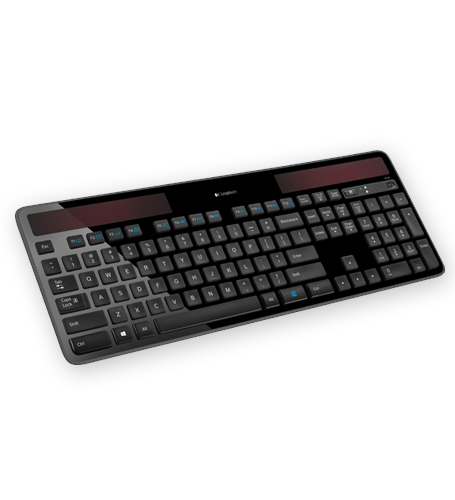
Where to buy Logitech Solar Wireless Keyboard K750


Newegg.com
$59.99
LINK

B&H
$56.99
LINK

BUY.COM
$69.62
LINK

J&R
$62.88
LINK

DIRECTRON
$58.95
LINK

MacMall
$65.99
LINK


Wednesday, July 13, 2011

Rosewill RK-9000 USB Keyboard


Many typing purists maintain that the IBM Model M keyboard will always be the standard to compare all modern keyboard designs to, especially for users that rely on the tactile feedback and satisfying "clack" emitted by the switches underneath the keys for accuracy and speed. The rise in popularity of mechanical keyboards that replicate the Model M's design opens the door to more independent companies like Rosewill making their own versions, and the RK-9000 has all the parts typists are looking for in a mechanical input device, including Cherry Blue switches, a tough nylon-wrapped USB cord, a low-profile design, and an affordable price to top it off. If you're just getting interested in these unique keyboards and don't care about extra USB ports or robust cases, the Rosewill RK-9000 is a great place to start.

The appeal of the RK-9000 starts with the mechanical switches that live underneath the keys. They're the same Cherry switches found in most mechanical keyboards including the Das Keyboard, and the MX Blue is the most tactile version available, with two stages of movement, with a longer vertical travel distance required to actuate each key press.

TAKEN FROM CNET

Saturday, July 9, 2011

Microsoft Natural Ergonomic Desktop 7000


The Microsoft Natural Ergonomic Desktop 7000 is a mainstream solution: It's likely not going to solve the unique problems of clinically injured computer users, but it does seem like a decent entry point for the average user who wants a slightly more body-friendly desktop setup than a standard keyboard and mouse. And it's priced accordingly, at $150--pricey for a desktop set, but really at the entry level for ergonomic solutions.
We used the Natural Ergonomic Desktop 7000 with our primary computer for several weeks, and we're mostly pleased with the level of comfort it offers. Our only gripes come from resistance: The keys feel just a bit too stiff, and the mouse scroll button requires just a bit too much force. These weren't enough to outweigh the other comfort benefits of the set's design for our moderately achy wrists, but they could very well be deal-breakers for those with more serious injuries.

The design of the keyboard in the Microsoft Natural Ergonomic Desktop 7000 is essentially the same as the Microsoft Natural Ergonomic Keyboard 4000, though the former connects to your computer wirelessly via a USB receiver. The split design rises in the middle to keep your wrists and arms in a naturally rotated position. An optional riser snaps under the front of the keyboard to create a backward slant that prevents you from flexing your wrists. You can further adjust the keyboard's height and angle via snap-up feet on the rear corners. The keyboard's wrist rest is padded with a faux-leather cover that's preferable to bare plastic but nevertheless not as comfortable as the gel wrist rests you can get elsewhere.
All these features add up to a rather comfortable typing experience; after just a few days with the Natural Ergonomic Keyboard we came to prefer it to traditional keyboards for all our typing. However, we were frustrated by the stiffness of the keys, especially the space bar. Even after prolonged use we felt we had to press just a bit too hard to type--not exactly ideal for a keyboard that's supposed to reduce repetitive stress injuries and certainly a deal breaker for anyone whose hand and wrist pain starts in their fingers.
The keyboard also incorporates a number of features designed to cut down on mousing. A row of silver buttons at the top of the board comes preprogrammed to do things such as launch your default Web browser or e-mail client, control media playback, and open the desktop calculator. Five additional numbered buttons can be programmed (via the included IntelliType Pro software) to launch any software or open a file of your choice. In case you forget what you've assigned to each button, the My Favorites button in the middle of the board calls up a window that shows you. In the area between the split keys resides a two-way toggle that lets you zoom in and out of the active page. Below the spacebar (and between the wrist pads) are two buttons--back and forward--that allow you to move between Web pages without having to reach for your mouse.


Not that mousing is all that painful with the Microsoft Natural Ergonomic Desktop 7000. In fact, though wrist pain forced us to start mousing with our left hand years ago, we found ourselves eschewing our own Logitech MX610 left-handed mouse in favor of the right-handed Microsoft Natural Ergonomic mouse. (Though we'd still prefer to have a left-handed version, which Microsoft sadly lacks.)
The elevated mouse looks more like a piece of fruit than a computer accessory, and its buttons, wheel, and palm rest all veer toward the right side. The idea behind the design is that it turns your wrist upward (almost, though not quite, like a handshake) and lets you rest your hand on the right side instead of putting pressure on the carpal tunnel area. The thumb rest and sides of the mouse are made of a rubberized material that lets users avoid the mouse death grip that so often accompanies extended computer work.
As with the keyboard, our primary complaint relates to resistance: In this case, the rubberized scroll wheel offers a bit more drag than we'd prefer. Also, though the mouse does incorporate thumb buttons, their poor placement between the thumb and forefinger meant that we hardly used them--they were just too difficult to reach without moving our entire hand.
Microsoft offers a three-year warranty on the Natural Ergonomic Desktop 7000. Phone support is free for the first 90 days--after that, support will cost $35 per request. The company's support Web site has a searchable knowledge base, FAQs, and software updates. You can also access chat and e-mail support at the site.

Taken From CNET

Free Games from STEAM

Some free to play games from STEAM

Champions Online: Free for All

Champions Online: Free for All brings epic heroism back to the MMORPG genre with depth that challenges the most experienced online gamers, while its fast-paced action engages new entrants to the online superhero universe. Join Defender and the legendary Champions to stop Dr. Destroyer and his minions in the ultimate showdown between good and evil.


http://store.steampowered.com/app/9880/

Global Agenda: Free Agent
2155. From the ashes of the devastating Third Great War rose the Commonwealth, an oppressive world government determined to control the entire planet. The few remaining independent factions retaliate the only way they can, with elite teams of special operatives trained in advanced warfare tactics and equipped with high-tech weaponry. The future of humanity is their battleground, where knowledge is power, technology is a race, and everyone has a Global Agenda.

http://store.steampowered.com/app/17020/

Team Fortress 2

"The most fun you can have online" - PC Gamer
Is now FREE!
There’s no catch! Play as much as you want, as long as you like!
The most highly-rated free game of all time!
One of the most popular online action games of all time, Team Fortress 2 delivers constant free updates—new game modes, maps, equipment and, most importantly, hats. Nine distinct classes provide a broad range of tactical abilities and personalities, and lend themselves to a variety of player skills.
New to TF? Don’t sweat it!
No matter what your style and experience, we’ve got a character for you. Detailed training and offline practice modes will help you hone your skills before jumping into one of TF2’s many game modes, including Capture the Flag, Control Point, Payload, Arena, King of the Hill and more.
Make a character your own!
There are hundreds of weapons, hats and more to collect, craft, buy and trade. Tweak your favorite class to suit your gameplay style and personal taste. You don’t need to pay to win—virtually all of the items in the Mann Co. Store can also be found in-game.


TAken From STEAM.COM

Thursday, July 7, 2011

Logic Controls LK 1800U

The LK1800 is a programmable alphanumeric keyboard with a full compliment of 61 function and numeric keys and an optional magnetic stripe reader. Furthermore, the unit also has a PS/2 I/O port to enable the daisy chaining of other input devices such as a scanner or check reader. The LK1800 programmable keyboard is thus an ideal solution for the retail, hospitality, travel, banking, and insurance industries.

The LK1800 is one of the easiest and most programmable keyboards on the market. All 132 keys are programmable and 44 keys are relegendable with transparent key caps. Using a powerful Windows-based programming utility that stores key definitions in a data file, an integrator can create a program layout for multiple keyboards, rather than programming key by key, keyboard by keyboard. The keys can be programmed with multiple shift levels to further increase the number of effective programmable keys, and a key lock switch is used to select the program layer - e.g., manager override, department 1, department 2, etc.


M.I.C’s Keyboard Buddy Case for the iPad 2

M.I.C’s Keyboard Buddy Case for the iPad 2


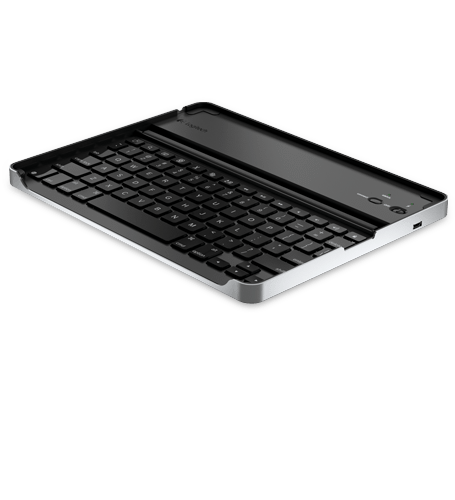
Zagg’s Zaggmate keyboard case for the iPad caused quite a stir when it launched last year.  Stealing the spotlight is M.I.C’s Aluminum Keyboard Buddy Case for iPad 2.  Fundamentally it’s the same thing as the Zaggmate; a slot to position the iPad in an upright position and a Bluetooth keyboard that recharges via a USB port.  The keyboard is almost full sized and includes media functions and brightness control.  But that’s where the similarities end.  M.I.C’s Aluminum Keyboard Buddy Case includes a set of magnets that automatically put the iPad 2 to sleep when it’s used as a protective cover. It’s curved to mimic the iPad 2′s design and is very Macbook Airesque.  There is no official word on battery life, but the keyboard will go into sleep mode when not in use.

You can grab M.I.C’s Aluminum Keyboard Buddy Case for $50.


Read more: 
http://www.gadgetreview.com/2011/07/m-i-cs-keyboard-buddy-case.html

Wednesday, July 6, 2011

Razer Blackwidow Review

Gazing upon my workspace, I can only imagine the grief my 6th grade summer school English teacher would feel. Disorganized, unorderly…madness, in a sense. She might even be too taken aback to notice two keyboards connected simultaneously to my computer, instead focusing on clutters of yellow papers and very little visible wood for such a large wooden desk.
But there is some order in that madness. You know, in the way that we all know where to walk when the floor is just too unclean, or how the too-full refrigerator is still so easy to navigate so long as no one but you touches anything. We just know where things go, until someone else needs something. No, the interesting part of the above image is the second keyboard. The Razer Blackwidow.
I wrote a fine review of the Blackwidow but didn’t publish it. I blame divine intervention, so that I may write this instead. Perhaps it’s because I needed Pandora to publicly debut comedy channels, where I heard a magnificient line about being wary of the word love. The comedian – who’s name I dare not remember – claimed saying “I love you” all the time loses it’s meaning. Considering the strength and power of the word, it’s a fair statement to make. Likewise, I’m hesitant to say that I love the Blackwidow.
This arachnid is phenominal. It’s better than any mechanical keyboard I’ve tested, including the Das Keyboard Model S and Matias Tactile Pro. The keys are the best I’ve ever typed on, without reservation. The absolute power of typing, of the written word, is brought to life with this keyboard and not stained with overbearing sound – the TACK TACK TACK of hail in your head normally reserved for mechanical keyboards – nor is it tarnished with poor design, maligned keys or cut corners. There is so much to love that, as a matter of fact, I’m having trouble saying that I don’t love the Blackwidow.
Furthermore, this model is not even the more expensive “Ultimate” model, just the standard, non-macro, no-backlighting, no-extra-jacks standard fare. Even without these bells and whistles, I haven’t had this much fun and true enjoyment from typing since the Das Keyboard. But as great as it is, I’ve still got my older, familiar Sidewinder X6 plugged in, and insanely for just two functions: the quick media keys and the volume knob.
I can say that without a doubt I love the volume knob. I’m not the only one who would rather change the stereo volume while driving with a knob rather than a button, right? That tactile feedback, the turning motion…it’s really primal, but more importantly it’s an easy tool to navigate. I can easily press the wrong button…but it’s much harder to turn a knob the wrong way accidentally.
Incidentally, I have several available options to adjust volume. That volume knob, my Razer Mako speakers directly, the media controls on the Blackwidow…but that knob is just so easy, so deliciously tactile. It doesn’t do the Blackwidow justice that the media keys are shared with the function keys, and that the FN key itself is lodged between the right alt and Windows key.
That is to say that I’m a picky bastard. Because even though I loved the X6 when it came out (and it still is a wonderful keyboard), the typing experience on the Blackwidow is kickass. I wouldn’t trade it for anything. In fact, I’d go so far as to say that I love it.
The Razer Blackwidow is available for purchase from Amazon for $73.12. The Razer Blackwidow Ultimate is also available from Amazon, for $155.99.


Taken From: http://www.gadgetreview.com

Monday, July 4, 2011

Logitech Tablet Keyboard for iPad Review

While it's technically possible to write on an iPad, for most people, laptops are still the mission-critical writing machine of choice. It's all about the keyboard: a virtual keyboard simply can't cut it.
Keyboard cases help, but they come with their own compromises. The Logitech Keyboard Case by Zagg was one of our favorites, but the slightly compressed keys might turn off serious writers.
Enter the Logitech Tablet Keyboard for the iPad. Like Apple's own white Bluetooth keyboard, Logitech's keyboard is a standalone Bluetooth device that can technically be used with any computer. It looks a lot like Apple's Bluetooth keyboard, too, except cast in black plastic instead of white. Like Apple's keyboard, Logitech's runs on batteries instead of using a charger (four AAAs).


What makes this keyboard iPad-specific, then? Well, the Tablet Keyboard wasn't just made with iPads in mind; Logitech in fact sells another version for Android tablets with slightly different buttons. But the advantages here come in terms of the keyboard's set of iOS-specific buttons, as well as the keyboard's ingenious convertible case/stand.

The microfiber-lined plastic shell magnetically opens up, and a small plastic stand clicks between both halves, forming a sturdy tabletop stand for portrait or landscape mode, with either the iPad or iPad 2. The stand's roomy enough to accommodate some back shells we've used. A slide-out tray gives the iPad extra tilt, which was fantastic for at-the-desk writing with the keyboard in our laps. In normal stand mode, my iPad 2 was elevated like a picture frame. In the extended-out stand mode, the iPad viewing angle changes to nearly 45 degrees.


Across the top number keys are a set of iPad-specific functions, activated by holding down Fn on the lower left and pressing. The 5 key doubles as a picture-gallery shortcut; the 7, 8, and 9 keys alternately rewind, play/pause, and fast-forward music tracks; volume controls are on the end. These basic functions mirror what's on other iPad keyboards, including Apple's. A search button is tucked away to the right of the Option key, and it launches Spotlight search. Alas, you can't keyboard-click searched-for apps and documents--you'll have to tap on the screen. A Home key on the top right works like the one on the iPad.

You could also use the Logitech keyboard with an iPhone, if you so choose; iOS 4.3 supports keyboards, and we were able to use it on our iPhone 4 without a hitch. Music and volume controls worked, too. You could even rest your iPhone on the elevated stand. It's an odd pairing, but doable.
Logitech's keyboard is high-quality, too. We used it to write this review, in fact. It feels great, with every key being where it should. The direction-arrow keys also enable zipping through docs without reaching up to touch the screen when making line edits. That's the difference in our opinion between a keyboard case and a full keyboard like this one: writing on a full keyboard makes the experience feel nearly indistinguishable from sitting at a computer.

The fact that we wrote this whole review on it and never got tired is the best recommendation we can give. At $69, this keyboard's well worth the money, unless you prefer Apple's solution and don't mind forgoing the stand. Think carefully about that choice, though; a stand matters more than you think.

TAKEN FROM CNET

BUY AT AMAZON


Sunday, July 3, 2011

Microsoft Wireless Desktop 2000


Microsoft unveiled the Wireless Desktop 2000 this week, which builds upon its predecessors by adding in 128-bit AES encryption to keep any prying eyes from picking up on your precious keystrokes. The 2.4GHz wireless connection that tethers your keyboard and mouse to the computer is encrypted strongly enough that it's unlikely to be broken within a reasonable time frame.


The keyboard comes with a few macro buttons to help navigate quickly through the Windows 7 operating system. It's also been partnered up with Microsoft's Wireless Mouse 2000, which uses their proprietary "BlueTrack" to increase tracking performance across a variety of surfaces. 
Both keyboard and mouse have been outfitted in a sleek, black finish. The bottom section of the keyboard comes with a black, built-in pillow. It's a common design feature of Microsoft desktop peripherals and is intended to ease strain on long-term typing sessions. The desktop set is available today, for the reasonable price of just $40.


Wednesday, June 29, 2011

Logitech Keyboard Case for iPad® 2

When will tablets like the iPad finally take over the laptop universe once and for all? It may not happen this year--or that year, for that matter--but convertible keyboard covers like the Logitech Keyboard Case will certainly accelerate the process.

We've wondered many times whether a good keyboard case could be the missing link that would make an ultraportable iPad an excellent tool for writing on the go. The $99 Logitech Keyboard Case by Zagg is the best we've seen so far. It's an update of last year's Zaggmate case for the iPad, tailored to fit the iPad 2's dimensions.


Unlike some cases we've tried before, the keyboard employed here is an honest-to-goodness "real" keyboard: the keys depress fully and feel physical, with no strange rubberized or flattened feel to them. The aluminum frame is the same width and length as an iPad 2, so when you're done typing, you can fold the iPad into it screen-down for travel.


The Logitech Keyboard Case works better as a keyboard than as a case, though. True, the iPad 2 nestles into the frame of the Logitech case smoothly, cradled by foam bumpers all around, and the case's matte aluminum finish matches the iPad 2's to a T. Yet, it fails to provide any protection for the iPad's back, one of the most vulnerable areas for scratching. When the iPad is seated in the case, it's also hard to casually remove it for quick use, and the iPad can't fit in the case screen-out. Also, while the iPad's screen is protected against contact with the keyboard thanks to several rubberized padded strips, it still made us a little uneasy to place keys so close to the glass. We chalk that up to iPad ownership neurosis.

Taken from CNET


Microsoft Comfort Curve Keyboard 3000


The latest in Microsoft's line of ergonomic keyboards, the Comfort Curve Keyboard 3000 is also the most affordable model in the line, and features perhaps the most unique design. The curved, contoured shape of the keyboard is a dramatic departure from standard keyboard designs, and with only a standard USB connection, the Comfort Curve Keyboard 3000 also has a reasonable $25 price tag. Keep shopping if you're interested in a more feature-filled keyboard, or a wireless model, but we like the Comfort Curve Keyboard 3000 for providing an affordable, straightforward typing experience with consideration for your physiological wellbeing.
No ergonomic design will fit everyone, but the general idea is that it minimizes wear on your joints to keep your hands perpendicular to the table and your wrists straight while typing. Extending that ideal through a product design would bring you an upright keyboard that's split in two. Such a design has been tried before, but in general, ergonomic keyboard designs take a less committed approach, as Microsoft did here.

The Comfort Curve Keyboard 3000 is arguably the most extremely ergonomically designed of Microsoft's keyboards. The Wireless Comfort Desktop 5000 and the Comfort Curve Keyboard 2000 have a gentler arc on the leading edge, and they also have no elevation in the middle of the keys. Logitech's Wireless Keyboard K350 is probably the closest to the Comfort Curve Keyboard 3000 in terms of its ergonomic profile, although the K350 goes a bit further with a more contoured design. Unlike the Logitech board, the Comfort Curve Keyboard 3000 only has a single rise, which peaks between the centrally located G and H keys.
Although Microsoft's Comfort Curve Keyboard 3000 offers a simpler ergonomic design than the Logitech board, it's also more affordable. You'll find the Comfort Curve Keyboard 3000 available for between $20 and $30, whereas the Logitech K350 sells for around $50. This price disparity makes sense in light of the difference in features.

 Techical specifications