Labels

Showing posts with label Mouse. Show all posts

Sunday, September 18, 2011

Targus to release new WiFi PAN-equipped Laser Mouse this September, flips Bluetooth the bird


Back in 2008, Ozmo Devices paired up with Intel to get its WiFi PAN (WiFi Personal Area Network) techinto low-power devices. Fast-forward to a few years later, tack on a new partnership with Targus and get ready for the first of those Bluetooth-less peripherals to hit the market. The company's new accessory teammate is planning to rollout a line of WiFi Laser mice that incorporate the OZMO2000 chip, with the first mouse to hit sometime this September. The unreleased AMW58US model will connect directly to your computer's WiFi receiver and packs a four-way scroll wheel, laser sensor and compatibility for Windows 7 -- batteries included. There's no pre-order page available at the moment, so you'll just have to sit tight and wait it out. Official PR awaits you after the break.

TAKEN FROM ENGADGET

Saturday, July 9, 2011

Microsoft Natural Ergonomic Desktop 7000


The Microsoft Natural Ergonomic Desktop 7000 is a mainstream solution: It's likely not going to solve the unique problems of clinically injured computer users, but it does seem like a decent entry point for the average user who wants a slightly more body-friendly desktop setup than a standard keyboard and mouse. And it's priced accordingly, at $150--pricey for a desktop set, but really at the entry level for ergonomic solutions.
We used the Natural Ergonomic Desktop 7000 with our primary computer for several weeks, and we're mostly pleased with the level of comfort it offers. Our only gripes come from resistance: The keys feel just a bit too stiff, and the mouse scroll button requires just a bit too much force. These weren't enough to outweigh the other comfort benefits of the set's design for our moderately achy wrists, but they could very well be deal-breakers for those with more serious injuries.

The design of the keyboard in the Microsoft Natural Ergonomic Desktop 7000 is essentially the same as the Microsoft Natural Ergonomic Keyboard 4000, though the former connects to your computer wirelessly via a USB receiver. The split design rises in the middle to keep your wrists and arms in a naturally rotated position. An optional riser snaps under the front of the keyboard to create a backward slant that prevents you from flexing your wrists. You can further adjust the keyboard's height and angle via snap-up feet on the rear corners. The keyboard's wrist rest is padded with a faux-leather cover that's preferable to bare plastic but nevertheless not as comfortable as the gel wrist rests you can get elsewhere.
All these features add up to a rather comfortable typing experience; after just a few days with the Natural Ergonomic Keyboard we came to prefer it to traditional keyboards for all our typing. However, we were frustrated by the stiffness of the keys, especially the space bar. Even after prolonged use we felt we had to press just a bit too hard to type--not exactly ideal for a keyboard that's supposed to reduce repetitive stress injuries and certainly a deal breaker for anyone whose hand and wrist pain starts in their fingers.
The keyboard also incorporates a number of features designed to cut down on mousing. A row of silver buttons at the top of the board comes preprogrammed to do things such as launch your default Web browser or e-mail client, control media playback, and open the desktop calculator. Five additional numbered buttons can be programmed (via the included IntelliType Pro software) to launch any software or open a file of your choice. In case you forget what you've assigned to each button, the My Favorites button in the middle of the board calls up a window that shows you. In the area between the split keys resides a two-way toggle that lets you zoom in and out of the active page. Below the spacebar (and between the wrist pads) are two buttons--back and forward--that allow you to move between Web pages without having to reach for your mouse.


Not that mousing is all that painful with the Microsoft Natural Ergonomic Desktop 7000. In fact, though wrist pain forced us to start mousing with our left hand years ago, we found ourselves eschewing our own Logitech MX610 left-handed mouse in favor of the right-handed Microsoft Natural Ergonomic mouse. (Though we'd still prefer to have a left-handed version, which Microsoft sadly lacks.)
The elevated mouse looks more like a piece of fruit than a computer accessory, and its buttons, wheel, and palm rest all veer toward the right side. The idea behind the design is that it turns your wrist upward (almost, though not quite, like a handshake) and lets you rest your hand on the right side instead of putting pressure on the carpal tunnel area. The thumb rest and sides of the mouse are made of a rubberized material that lets users avoid the mouse death grip that so often accompanies extended computer work.
As with the keyboard, our primary complaint relates to resistance: In this case, the rubberized scroll wheel offers a bit more drag than we'd prefer. Also, though the mouse does incorporate thumb buttons, their poor placement between the thumb and forefinger meant that we hardly used them--they were just too difficult to reach without moving our entire hand.
Microsoft offers a three-year warranty on the Natural Ergonomic Desktop 7000. Phone support is free for the first 90 days--after that, support will cost $35 per request. The company's support Web site has a searchable knowledge base, FAQs, and software updates. You can also access chat and e-mail support at the site.

Taken From CNET

Free Games from STEAM

Some free to play games from STEAM

Champions Online: Free for All

Champions Online: Free for All brings epic heroism back to the MMORPG genre with depth that challenges the most experienced online gamers, while its fast-paced action engages new entrants to the online superhero universe. Join Defender and the legendary Champions to stop Dr. Destroyer and his minions in the ultimate showdown between good and evil.


http://store.steampowered.com/app/9880/

Global Agenda: Free Agent
2155. From the ashes of the devastating Third Great War rose the Commonwealth, an oppressive world government determined to control the entire planet. The few remaining independent factions retaliate the only way they can, with elite teams of special operatives trained in advanced warfare tactics and equipped with high-tech weaponry. The future of humanity is their battleground, where knowledge is power, technology is a race, and everyone has a Global Agenda.

http://store.steampowered.com/app/17020/

Team Fortress 2

"The most fun you can have online" - PC Gamer
Is now FREE!
There’s no catch! Play as much as you want, as long as you like!
The most highly-rated free game of all time!
One of the most popular online action games of all time, Team Fortress 2 delivers constant free updates—new game modes, maps, equipment and, most importantly, hats. Nine distinct classes provide a broad range of tactical abilities and personalities, and lend themselves to a variety of player skills.
New to TF? Don’t sweat it!
No matter what your style and experience, we’ve got a character for you. Detailed training and offline practice modes will help you hone your skills before jumping into one of TF2’s many game modes, including Capture the Flag, Control Point, Payload, Arena, King of the Hill and more.
Make a character your own!
There are hundreds of weapons, hats and more to collect, craft, buy and trade. Tweak your favorite class to suit your gameplay style and personal taste. You don’t need to pay to win—virtually all of the items in the Mann Co. Store can also be found in-game.


TAken From STEAM.COM

Friday, July 8, 2011

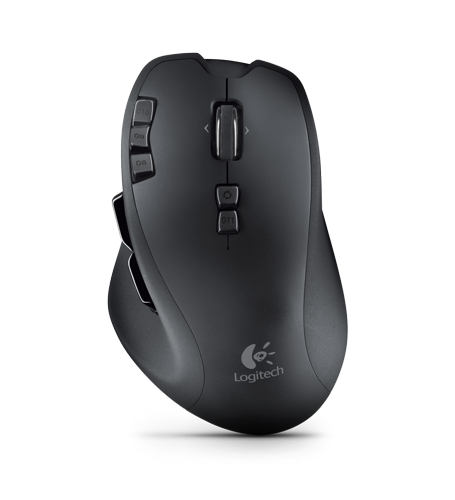
Logitech Wireless Gaming Mouse G700 review

The G700 is the only wireless gaming mouse we've seen. If you don’t want to risk the battery dying during a gaming session, the included USB cable can be attached. A rechargeable AA battery is included and will automatically be topped up whenever you plug the USB cable in.
The mouse is fairly heavy and we preferred using some of the lighter models on test, such as the SteelSeries Xai. However, we liked its slightly rough texture and there’s no shortage of extra buttons. Four thumb-activated controls sit on the left side, with a further five on top.

All are sensibly placed, so you’re unlikely to bash them by accident. Most of the buttons can be customised, but finding the right one during a high-paced gaming session isn’t easy. The scroll wheel has an optional free-flowing mode that’s activated by a button on the top of the mouse.
If you'd rather have a wireless model, this is a good mouse, but the SteelSeries Xaiis cheaper and more comfortable.

Sunday, July 3, 2011

Microsoft Wireless Desktop 2000


Microsoft unveiled the Wireless Desktop 2000 this week, which builds upon its predecessors by adding in 128-bit AES encryption to keep any prying eyes from picking up on your precious keystrokes. The 2.4GHz wireless connection that tethers your keyboard and mouse to the computer is encrypted strongly enough that it's unlikely to be broken within a reasonable time frame.


The keyboard comes with a few macro buttons to help navigate quickly through the Windows 7 operating system. It's also been partnered up with Microsoft's Wireless Mouse 2000, which uses their proprietary "BlueTrack" to increase tracking performance across a variety of surfaces. 
Both keyboard and mouse have been outfitted in a sleek, black finish. The bottom section of the keyboard comes with a black, built-in pillow. It's a common design feature of Microsoft desktop peripherals and is intended to ease strain on long-term typing sessions. The desktop set is available today, for the reasonable price of just $40.


Saturday, July 2, 2011

Raptor-Gaming LM3 Mouse

The Raptor-Gaming LM3 is presented in a compact sealed plastic packet with the mouse clearly visible through the front. Turning over to the back of the packet we find a description of the mouse along with some of the key features presented in a number of languages.

The LM3 mouse has a simple design with an all-black finish that includes some subtle illumination. The heel of the mouse has a shiny black coating with the Raptor-Gaming name stamped on it. Just above this is a clear plastic section which, when the mouse is plugged in, lights up red.

The LM3 is designed for use with the right hand and features a total of five buttons and a large scroll wheel.


Turning to the front of the LM3 mouse we find two large mouse buttons which are finished with a rubber coating. There is also a large scroll wheel, and just behind that we find the button to switch through the pre-programmed DPI settings.


The left hand side of the LM3 mouse features a large raised section which has a rubberised thumb grip on it. We also find two additional buttons which are set to move backward and forwards through our preferred web browser.

The right hand side of the LM3 is plain but features the same rubber coating found on the two main mouse buttons. This soft touch surface is designed for comfort and control.


On the base of the mouse we find four feet and a 2400dpi optical sensor.


The LM3 features a USB cable, approximately 2.5 meters in length and this ends with a gold plated USB connector.


The LM3 mouse from Raptor-Gaming offers a classically designed mouse with simple plug and play capabilities. With a slightly lower price point it would be a far more attractive purchase.


Taken from hardware heaven

Thursday, June 30, 2011

HP Wi-Fi Mobile Mouse

Those who travel for work with a small laptop know the value of a spare USB port. With Bluetooth still a rarity on mobile PCs, Hewlett-Packard's Wi-Fi Mobile Mouse offers an alternative way to free up some extra connectivity. For $49.99 when it debuts this June, the Wi-Fi Mobile Mouse will connect to your Windows 7 laptop directly via your wireless networking adapter, no USB receiver dongle necessary. In testing, we found the mouse easy to set up, and we were impressed by its robust connection strength, at least on newer laptops. We would make a few tweaks to the software, but despite some minor quibbles, we can recommend this mouse to laptop users looking to free up a USB port.

Aside from its unique connection method, the Wi-Fi Mobile Mouse isn't all that extraordinary. Its small size tells you that it's designed for travel, and its ambidextrous design invites anyone to use it. You will find the button on the side opposite your thumb difficult to press without changing your grip, but we like the four-way scroll wheel that lets you easily navigate up and down and from left to right through larger documents.

Wi-Fi connectivity is really the primary selling point for the Wi-Fi Mobile Mouse. HP says the mouse is meant for use with Windows 7-certified wireless adapters, which you'll find listed on Microsoft's Web site. That means the mouse works only with Windows 7-based PCs (we checked, and the drivers won't install on Windows XP or OS X), and only with certain wireless adapters.
We tried the mouse on Intel-based Windows 7 laptops from Sony and Lenovo and had no problems. The connection was far less reliable on a Dell XPS 8300 desktop with a Dell-made wireless adapter not listed among Microsoft's certified Wi-Fi devices. We had similar difficulties with a Gateway desktop that also lacked a Microsoft-certified adapter. Microsoft's list does mention all current Intel laptop-chipset wireless adapters, which covers a broad set of current systems.

Setting up the Wi-Fi Mobile Mouse involves nothing more than installing the drivers from the included CD and following the onscreen prompts. There's a brief pairing process, but it only requires pressing a button on the bottom of the mouse once. You need to have your wireless receiver enabled to detect the mouse, but your PC does not need to be connected to a network.
Once we installed the mouse, we had no difficulty maintaining a steady connection. The signal held up when we connected each laptop to the Web over a wireless network, and stayed just as strong while we browsed around and simultaneously downloaded a multigigabyte file. HP promises a 30-foot connection range for the mouse. We found the connection held up when we used it from more than 38 feet away in a large conference room. We were not able to test the battery life, but HP promises the two included alkaline AA batteries will last for nine months.

The Wi-Fi Mobile Mouse involves a few peculiarities. As mentioned, you lose the connection to the mouse if you disable your PC's wireless adapter. That's perhaps not surprising on paper, but it might be if you use the mouse while troubleshooting a network connection. And while we appreciate the mouse's responsive laser sensor, adjusting the sensor's sensitivity requires an awkward, poorly described process of pressing multiple buttons on the mouse simultaneously for 3 seconds to cycle through the various sensitivities. Why HP didn't employ a simple drop-down menu or a slider for selecting the sensitivities in the driver software is a mystery. Also, given the laptops out there without an optical drive, we'd encourage HP to make the mouse drivers available for download in addition to including them on a DVD.
Conclusions
We don't expect the HP Wi-Fi Mobile Mouse will replace wireless mice that use USB-based RF wireless or Bluetooth connections, but as an alternative for those who need more USB inputs, this mouse makes sense. Just be sure to do your homework before making a purchase, because the connection using non-Windows 7 certified wireless adapters can be frustratingly irregular.

Review taken from: Cnet reviews

Logitech Couch Mouse M515 mouse

With a few key design tweaks, Logitech has created a sensible living-room computing accessory with its Couch Mouse M515. The sealed-in sensor will remain free of obstructing dirt and hair, and grip detection technology provides insurance against unintended clicks. For $50, the M515 might feel like a luxury product compared with more affordable wireless mice, but it's also a less expensive option than some higher-end media mice. We recommend it to living-room-computing enthusiasts who don't already have a reliable input device.

The Couch Mouse M515 is smaller than a standard desktop mouse, but a little larger than a typical laptop mouse. That's probably a wise design decision by Logitech, in that a full-size mouse could feel cumbersome in the living room, but a smaller design might be easily lost.
A wireless mouse, the Couch Mouse M515 is also a member of Logitech's Unified Device family, which lets you use multiple devices from a single Micro-USB wireless receiver. Logitech offers a number of Unified keyboards that could also work on the same adapter used by the Couch Mouse, but none of them are small enough to qualify as living-room keyboards. Even if there are no obvious other products that would accompany the Couch Mouse and its Unified receiver, you will likely appreciate that the receiver is so small that it essentially disappears into most USB ports.
The hallmark feature of the Couch Mouse lies in its underside. Unlike most mice that use an optical sensor to track your movement, the Couch Mouse has no hole for the sensor to shine through. Instead, the plastic covers the sensor to keep out dust, pet hair, crumbs, and other living-room detritus that can become lodged inside the mouse and disrupt the sensor's accuracy.


The benefits to such a design are clear, but Logitech has also addressed the negatives, designing the plastic covering over the sensor in such a way that scrolling is as smooth as with a standard mouse. Logitech does recommend using a mouse pad if you intend to use the Couch Mouse on a glossy surface, but we had no problems using it on a wooden desk with a shiny polyurethane finish.
Also unique to the Couch Mouse is its hand detection technology. If the idea is that you will use this mouse on a soft surface that you and others might be sitting on, it's reasonable to assume that the mouse might end up on a blanket, a pillow, or otherwise mixed up in your seating arrangements. With the hand detection technology, the mouse won't activate unless someone is gripping it, which ensures that it won't accidentally click and disrupt whatever you might be watching or listening to. That feature also conserves battery life. Logitech claims that the pair of standard AA batteries included with the Couch Mouse will last for around two years. Remind us in 2013 and we'll try to report back.
We also like that Logitech has added its HyperScroll wheel to the Couch Mouse. Normally a feature reserved for Logitech's higher-end mice, the HyperScroll wheel offers the best scrolling experience on the market. In its standard mode, the wheel has the same ratcheted scrolling action of any typical mouse. Press in the scroll wheel, and the wheel spins freely, letting you zip down long Web pages almost instantly. Throw in the side-to-side tilting feature that lets the wheel act like forward and backward buttons, and the Couch Mouse gives you an impressive array of options for navigating Web pages, lists, and documents quickly.

Conclusion
Logitech's Couch Mouse M515 isn't the most innovative living-room product out there. It doesn't have a gyroscope or a built-in keyboard, and you can't use it as a universal remote control. What it lacks in high-end features, it makes up for in functionality and sensible design. You can certainly get away with using a standard wireless mouse in your living room, but the Couch Mouse M515 will offer a significantly improved, sensor-obstruction-free experience for a reasonable cost.

Review taken from: Cnet reviews

Logitech Wireless Gaming Mouse G700

With the G700 Logitech have created one of the best performing and most flexible mice ever. By designing a mouse for the enthusiast/gaming crowd they have opened up a huge amount of configuration options which benefit FPS players as much as MMORPG-ers but in addition to that, the ability to set profiles means that the G700 is just as good for office use by professionals. Wired or wireless, 200 DPI to 5700DPI, manual profile switching and auto-switching, macro buttons combined with task buttons, even the ability to access our profiles on any system... the G700 has it all and packs it into a solid body with top notch software.

Technical Specifications

Tracking
  • Resolution: 200 – 5,700 dpi
  • Image processing: 12 megapixels/second
Responsiveness
  • USB data format: 16 bits/axis
  • USB report rate: Up to 1,000 reports/second
  • Sleep mode: variable
Glide
  • Dynamic coefficient of friction - Mu (k): .09**
  • Static coefficient of friction - Mu (s): .14**
Durability
  • Buttons (Left / Right):  8 million clicks
  • Feet:  250 kilometers
Max. acceleration
  • 30G* Max. speed: up to 165 inches(4.19 m)/second*

Package Contents

  • Mouse
  • Wireless receiver
  • Charging cable
  • Receiver extender cable
  • User documentation